
Appearance
안드로이드 단축키
Ctrl + Alt + L : 코드정렬안드로이드 테마 다크로 변경하기
"Theme.AppCompat.Light.DarkActionBar" -> "Theme.AppCompat.NoActionBar"안드로이드 설치 후 세팅 (20180225일 19시)
File > Setting > Appearance & Behavior> System Settings
Reopen last project on startup

File > Setting > Editor > General > Auto Import

Add unabiguous imports on the fly
Optimize imports on the fly (for current project)

File > Settings > Tools > Emulator > Launch in a tool window 체크해제
안드로이드 상태바에 Notifications 보내기
안드로이드 json 파싱
android에서 Navigation Drawer 사용하기
- https://www.sitepoint.com/material-design-android-design-support-library/
- https://github.com/sitepoint-editors/Design-Demo
- http://kitesoft.tistory.com/61
- http://androiddeveloper.tistory.com/55
- https://www.youtube.com/watch?v=iNMtT8L7E5U
- http://www.kmshack.kr/2017/01/디자이너-없이-안드로이드-앱-디자인하기/
- https://www.inflearn.com/course/안드로이드-스튜디오-안드로이드-앱-만들기/
AOS, iOS 앱 경로
- AOS(Android): https://play.google.com/store/apps/details?id=com.dki.spb_android
- iOS: https://itunes.apple.com/us/app/keynote/id1037272004?mt=8
안드로이드 리팩토링 방법 (dex2jar,jd-gui,apktool)
폰갭 설치
Error:Could not determine the class-path for interface com.android.builder.model.AndroidProject.
No service of type Factory available in ProjectScopeServices. Open File
해결 방법
- build.gradle
gradle
dependencies {
  classpath 'com.android.tools.build:gradle:2.3.2'
// classpath 'com.github.dcendents:android-maven-plugin:1.0'
}
// Top-level build file where you can add configuration options common to all sub-projects/modules.
buildscript {
  repositories {
       mavenCentral()
  }
  dependencies {
       classpath 'com.android.tools.build:gradle:0.12.2'
      classpath 'com.github.dcendents:android-maven-plugin:1.0'
}
}
task wrapper(type: Wrapper) {
  gradleVersion = '1.12'
}- gradle-wrapper.properties
properties
distributionUrl=https\://services.gradle.org/distributions/gradle-3.3-all.zip- build.gradle(library)
gradle
apply plugin: 'com.android.library'
//apply plugin: 'android-maven'
android webview chrome debugger
1. PC에 USB 연결
2. chrome://inspect/#devices
3. 연결시 USB 디버깅 등 확인
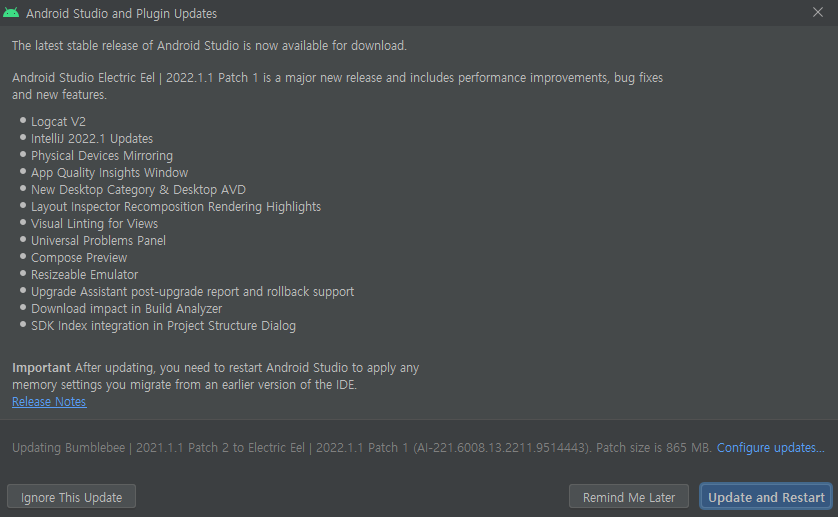
[ERROR] please retry with version 2021.2.1 or newer
Unrecognized Android Studio (or Android Support plugin for IntelliJ IDEA) version , please retry with version 20XX.X.X or newer.
File > Help > Check for Updates 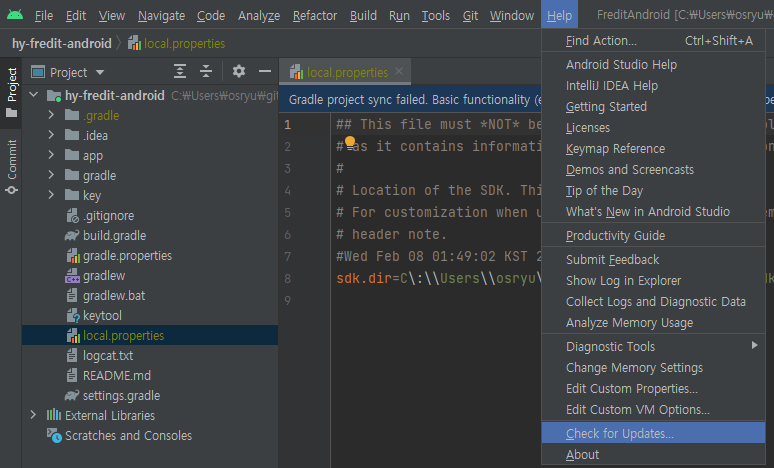

android jetpack
https://developer.android.com/jetpack/androidx/explorer?hl=ko
Android Decompile
- http://woowabros.github.io/experience/2017/07/17/resume.html
- https://dwfox.tistory.com/43
- http://gyuha.tistory.com/491
- http://goodtogreate.tistory.com/entry/APK-바이너리-수정후-리패키징repack
- http://layers7.tistory.com/7?category=724470
- https://m.blog.naver.com/PostView.nhn?blogId=coogi21c&logNo=220990437650&categoryNo=0&proxyReferer=https%3A%2F%2Fwww.google.co.kr%2F
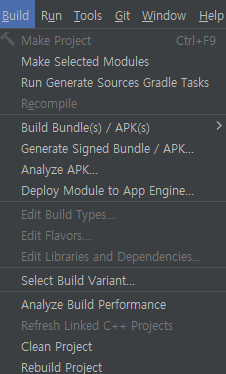
Android build
Clean Project
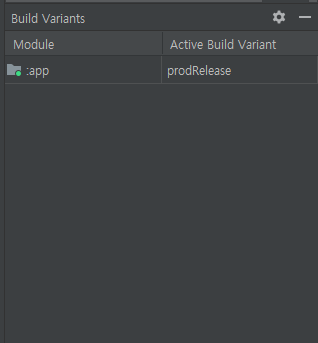
Build Variants
Android icon
- https://www.appicon.co/
- android/app/src/main/res 기본 아이콘 경로로 변경
- res - New - Image Asset
- manifest.xml application icon과 roundIcon 변경
Android decompile
1. Dex2Jar
apk이미지를 jar파일로 변환해 줍니다.

URL : http://sourceforge.net/projects/dex2jar
Download : http://sourceforge.net/projects/dex2jar/files
2. jd-gui
jar 파일의 내용(소스코드)보여 주는 툴

URL : https://github.com/pxb1988/dex2jar
Download : https://github.com/java-decompiler/jd-gui/releases
3. Apk Studio
안드로이 리소스를 쉽게 풀어 줍니다.

URL : http://www.vaibhavpandey.com/apkstudio/
Download : https://bintray.com/vaibhavpandeyvpz/generic/apkstudio/view


dex2jar.zip 파일의 압축을 풀고, cmd 에서 아래와 같이 실행하면 됩니다.

d2j-dex2jar.bat -f -o [파일명].jar [APK 파일명].apk

facebook apk를 예제로 풀어 보면, 아래와 같습니다.

d2j-dex2jar.bat -f -o sample.jar com.chbreeze.jikbang4a.apk

jar의 내용 보기 : jd-gui
jd-gui를 실행해서 파일 열기위로 위에서 변환했던 jar 선택하면, 소스를 볼 수 있습니다.

apk-studio로 실행해서 보시면 됩니다.
안드로이드 아이콘으로 apk 파일을 선택하시면, 안에 있는 파일을 풀고 조회가 가능 합니다.
bat
C:\DEV\tools\dex2jar-2.0\d2j-dex2jar.bat -f -o C:\DEV\tools\dex2jar-2.0\test.jar C:\DEV\tools\dex2jar-2.0\test.apk

apktool d C:\Users\f5074\Downloads\tester.apk

C:\Users\f5074\AppData\Local\apktool\framework\
avd 장치 실행 안됨
bash
# 변경전
hw.gpu.enabled=yes
hw.gpu.mode=auto
# 변경후
hw.gpu.enabled=no
hw.gpu.mode=off
debugging
bash
# 1. 폰 연결, CMD 실행
# 2. 앱의 PID 확인
adb shell ps | grep 패키지명
# 3. 로그캣 실행
adb logcat --pid=패키지PID

filddler 활용해서 api 호출 확인